

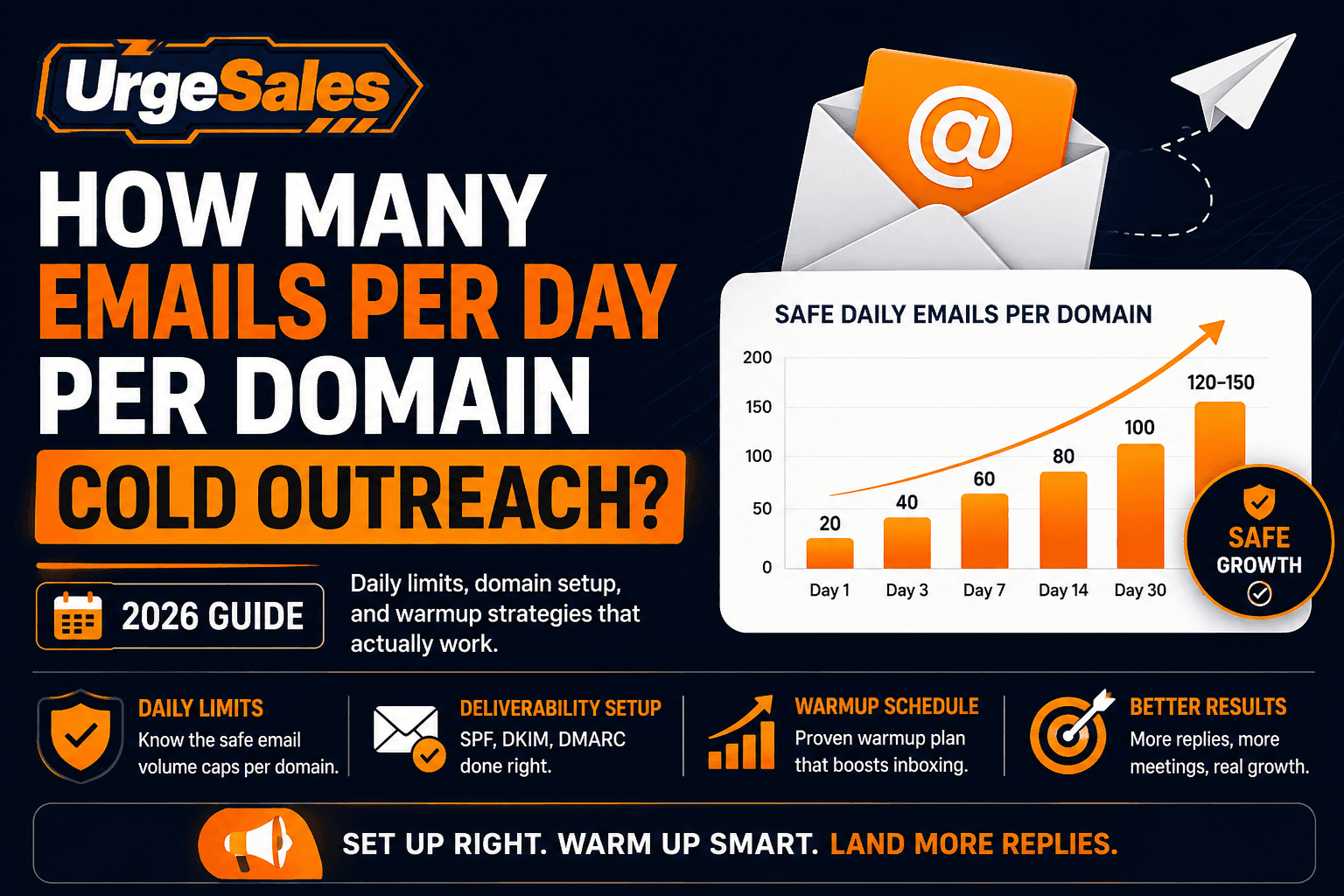
Determining how many emails per day per domain cold outreach campaigns should safely send is the single most critical decision in modern sales engagement. Send too few messages, and your sales pipeline stalls; send too many too fast, and major inbox service providers (ESPs)—such as Google Workspace and Microsoft 365—will flag your sending infrastructure as bulk spam.
In 2026, receiving mail servers utilize automated machine learning algorithms to analyze email sending velocity, domain age, authentication alignment, and engagement ratios in real time. If your sending pattern mimics automated commercial blasting, your outbound landing rates will plummet from primary inboxes directly to the spam folder or quarantine queue.
This comprehensive guide breaks down exact daily volume caps, secondary domain infrastructure strategies, technical DNS authentication setups, content filters, and a step-by-step 4-week domain warmup schedule designed to safeguard your sender reputation while scaling outbound pipeline.
1. Daily Volume Limits: Safe vs. High-Risk Sending Metrics
When sales operations teams ask how many emails per day per domain cold outreach programs can send, the answer depends on how your email infrastructure is distributed across individual sending accounts. When evaluating how many emails per day per domain cold outreach setups allow, email service providers look closely at sending frequency.
The strict industry benchmark for 2026 enforces a maximum daily cap of 30 to 35 cold emails per inbox per day, with a maximum limit of 2 to 3 active sending inboxes per domain.
This means a single secondary domain should never process more than 60 to 100 total cold emails per day across all attached sending accounts. Pushing a single domain beyond 100 cold emails daily triggers automated velocity filters on ESP networks, leading to rate-limiting (deferrals) and permanent domain blacklisting.
| Email Infrastructure Parameter | Recommended Safe Limit | Caution Threshold | High-Risk Burn Zone |
| Outbound Emails / Inbox / Day | 30 – 35 emails | 36 – 50 emails | > 50 emails / day |
| Active Inboxes / Sending Domain | 2 – 3 inboxes | 4 inboxes | > 5 inboxes / domain |
| Total Outbound Volume / Domain / Day | 60 – 100 emails | 101 – 150 emails | > 150 emails / day |
| Minimum Domain Warmup Period | 14 – 21 days | 7 – 13 days | < 7 days |
| Target Campaign Bounce Rate | < 2.0% | 2.1% – 3.0% | > 3.0% |
| Maximum Spam Complaint Rate | < 0.01% (1 per 10k) | 0.02% – 0.05% | > 0.08% |
Why ESP Velocity Algorithms Flag High-Volume Domains
Email service providers evaluate domain health using sending consistency patterns. Natural human business communication varies throughout the day and stays within reasonable sending thresholds. When a newly registered or low-reputation domain sends 200 emails within a short window, receiving security gateways mark the behavior as automated commercial spam.
To achieve scale without burning domain reputation, B2B outbound teams must scale horizontally by acquiring multiple secondary domains rather than scaling vertically by overloading a single sending account.
2. Infrastructure Setup: Protecting Your Core Business Domain
Once you configure your daily sending limits, follow our complete 10-Step B2B Cold Email Playbook to structure your entire campaign from lead list to closed deal.
Never conduct outbound sales prospecting from your primary corporate domain (e.g., yourcompany.com). If an aggressive outreach campaign results in high spam complaints or blacklist placements, running campaigns on your main domain will jeopardize internal corporate communication, client management emails, and transactional message delivery.
A primary factor in how many emails per day per domain cold outreach programs can sustain is secondary infrastructure isolation. To build an isolated, high-deliverability cold email engine, follow this infrastructure setup framework:
A. Secondary Domain Strategy
Purchase secondary domain variations that closely resemble your primary brand name.
-
Primary Corporate Domain:
acme.com -
Secondary Outreach Variants:
getacme.com,tryacme.com,acmehq.com,acmeapp.io
Ensure every secondary domain automatically redirects its web traffic (301 redirect) back to your main website homepage. When prospects receive a cold email and search the domain root in their browser, they should seamlessly land on your official site.
B. Workspace Account Multiplicity
For each secondary domain, set up dedicated Google Workspace or Microsoft 365 business seats.
-
alex@getacme.com -
alex.m@getacme.com -
a.miller@getacme.com
By capping each inbox at 30 cold outreach messages per day, a sales representative operating across 3 secondary domains (with 3 inboxes per domain) can send 270 highly targeted cold emails per day while staying well under security thresholds on every individual domain.
3. Technical Email Authentication Protocols: SPF, DKIM, & DMARC
Proper DNS authentication is non-negotiable. Without valid Sender Policy Framework (SPF), DomainKeys Identified Mail (DKIM), and Domain-based Message Authentication, Reporting & Conformance (DMARC) alignment, receiving servers will automatically filter your messages to spam or reject them entirely.
To verify your DNS setup, consult official security standards outlined by the Internet Engineering Task Force (IETF RFC 7489).
                     +----------------------------------+
                     |    Cold Email Outbound Sender    |
                     +----------------------------------+
                                      |
                                      v
                     +----------------------------------+
                     |        DNS Records Lookup        |
                     |  1. SPF (Authorized Sending IP)  |
                     |  2. DKIM (2048-bit Cryptography) |
                     |  3. DMARC (Policy & Reporting)   |
                     +----------------------------------+
                                      |
                                      v
                     +----------------------------------+
                     |    Receiving Server Verification |
                     +----------------------------------+
                        /                            \
                       /                              \
                      v                                v
          [ SPF & DKIM Aligned ]              [ Alignment Failure ]
                      |                                |
                      v                                v
            +-------------------+            +-------------------+
            |  Primary Inbox    |            |   Spam / Reject   |
            +-------------------+            +-------------------+
SPF (Sender Policy Framework) Setup
SPF specifies which mail servers are legally permitted to send email on behalf of your domain name. Ensure your SPF TXT record contains only active sending sources to prevent the 10-lookup DNS limit error.
-
TXT Record Name / Host:
@oryourdomain.com -
TXT Value (Google Workspace Example):
Plaintext
v=spf1 include:_spf.google.com include:sendgrid.net ~all
DKIM (DomainKeys Identified Mail) Setup
DKIM attaches a cryptographic signature to every outgoing message. Receiving servers verify this signature against your domain’s public DNS key to ensure the email content was not tampered with during transit.
In 2026, receiving servers mandate 2048-bit key length for commercial outreach. Access your Google Workspace Admin Console or Microsoft 365 Security Center to generate your 2048-bit DKIM TXT record, then add it to your domain’s DNS provider (Cloudflare, Namecheap, GoDaddy).
DMARC (Domain-based Message Authentication, Reporting & Conformance) Setup
DMARC utilizes both SPF and DKIM to determine the authenticity of an incoming email. It defines how receiving mail servers should handle emails that fail SPF or DKIM checks.
-
TXT Record Name / Host:
_dmarc -
Recommended Initial Value:
Plaintext
v=DMARC1; p=quarantine; rua=mailto:dmarc-reports@yourdomain.com; pct=100
Pro Tip for DMARC Rollout: Start with
p=noneduring your initial domain warmup period to collect aggregate performance data. Once your authentication tools confirm 100% alignment across SPF and DKIM, escalate your DMARC policy top=quarantineorp=rejectto protect your domain reputation.
4. Custom Tracking Domains & Reputation Isolation
By default, cold outreach tools record opens and link clicks using generic, shared tracking subdomains. Because thousands of separate users share those default tracking subdomains, bad sending behavior by an unrelated user can drag down your deliverability scores.
Calculating how many emails per day per domain cold outreach campaigns can send requires isolating your tracking infrastructure. Configuring custom tracking domains heavily impacts how many emails per day per domain cold outreach campaigns can execute without hitting spam filters. You must set up a custom CNAME tracking domain for every secondary domain you register.
| Record Type | Host / Subdomain Name | Target Value / Points To | TTL |
| CNAME | track |
prox.instantly.ai (or platform equivalent) |
3600 (Auto) |
| TXT (SPF) | @ |
v=spf1 include:_spf.google.com ~all |
3600 |
| TXT (DMARC) | _dmarc |
v=DMARC1; p=quarantine; ... |
3600 |
Once configured, verify your tracking subdomain using Google’s official Google Postmaster Tools platform to monitor your domain and IP reputation directly from Google’s internal systems.
5. Step-by-Step 4-Week Domain Warmup Schedule
Newly registered domains have zero historical sending metrics. Launching outreach immediately on a brand-new domain will result in instant rate-limiting and spam filtering. You must build domain reputation over 3 to 4 weeks using automated peer-to-peer warmup networks. Following a progressive warmup timeline determines how many emails per day per domain cold outreach accounts can send safely in week four.
Follow this progressive daily volume schedule for every new sending account:
| Warmup Phase | Daily Warmup Pool Volume | Daily Outbound Cold Volume | Target Spam Complaint Rate |
| Week 1 (Days 1–7) | 10 – 15 emails / day | 0 cold emails (Warmup only) | 0.00% |
| Week 2 (Days 8–14) | 20 – 30 emails / day | 5 – 10 cold emails / day | < 0.01% |
| Week 3 (Days 15–21) | 35 – 40 emails / day | 15 – 20 cold emails / day | < 0.01% |
| Week 4+ (Day 22 Onward) | 40 – 50 emails / day (Maintenance) | 30 – 35 cold emails / day (Hard Cap) | < 0.01% |
For proven strategies on writing high-converting outreach copy once your domain warmup is complete, check out our guide on how to build a cold email sequence that gets 20%+ reply rates.
6. Cold Email Copy Optimization to Pass AI Filters
Modern inbox providers evaluate incoming email content using natural language processing (NLP) models. These AI filters search for spam trigger words, unnatural link density, non-standard formatting, and suspicious tracking mechanics.
To ensure your cold email body copy passes AI content evaluation filters, implement these copy optimization rules:
Avoid Spam Trigger Words
Exclude high-risk commercial language from your subject lines and body copy:
-
Financial Triggers: “100% Free,” “Earn $,” “Risk-Free,” “No Cost,” “Lower Rates.”
-
Urgency Triggers: “Act Now,” “Urgent,” “Limited Time Offer,” “Apply Immediately.”
-
Sales Hype: “Guaranteed,” “Miracle,” “Winner,” “Special Promotion.”
Control Link & Attachment Density
-
Initial Outreach Touchpoints: Include zero links or a maximum of 1 plain-text link in the initial message. Never include raw URLs or link shorteners (e.g., bit.ly).
-
Attachments: Never attach PDFs, ZIP files, or media images in initial touchpoints. File attachments trigger strict virus and malware scanning filters.
-
HTML vs. Plain Text: Send outreach as plain text or simple HTML without complex structural layouts, embedded CSS styles, or custom font colors.
Incorporate Unsubscribe Headers
Ensure your sales automation software embeds standard RFC 8058 List-Unsubscribe headers in your email headers. Allowing prospects an easy, one-click opt-out option significantly reduces manual “Report Spam” clicks—the single most damaging event for domain reputation.
7. List Hygiene & Real-Time Email Verification
Even if your daily sending limits and DNS authentication are perfect, sending cold emails to invalid or non-existent email addresses will instantly ruin your deliverability. Maintaining clean email lists directly controls how many emails per day per domain cold outreach strategies can deliver successfully.
When an email bounces, receiving servers record a hard bounce notice. If your overall campaign bounce rate exceeds 2.0%, email service providers categorize your domain as an unverified bulk sender.
Implementing a 3-Step Verification Stack
-
Syntax Checking: Remove addresses with missing
@symbols, invalid domain extensions, or typos. -
MX & DNS Verification: Confirm that the prospect’s recipient domain has active MX records capable of accepting incoming mail.
-
SMTP Ping Verification: Perform a real-time SMTP handshake with the recipient’s server to confirm the specific mailbox exists without sending an actual email.
Handling Catch-All (Accept-All) Domains
Catch-all domains are configured to accept mail sent to any address at that domain, making it impossible to verify mailbox existence via standard SMTP pings.
Deliverability Rule: Never send cold outreach to unverifiable catch-all addresses from a new domain. Segregate catch-all leads into a separate testing campaign, or discard them entirely to protect your primary domain reputation.
To cross-check sender guidelines directly from major inbox providers, consult official documentation at Google Workspace Email Sender Guidelines.
8. Managing Replies and Positive Engagement Metrics
Sending caps only represent half of the deliverability equation; inbox providers also track how recipients interact with your messages once delivered. High positive engagement signals build domain authority, raising your daily sending ceiling over time.
Key Positive Engagement Signals
-
Reply Rate: Positive, conversational replies signal to ESPs that your content is desired. Aim for a target response rate above 5% to 10%.
-
Marked as Important / Starred: When recipients star your email or move it to their primary folder, domain reputation increases.
-
Open Velocity: Balanced open rates spread across peak business hours indicate natural human reader activity.
Handling Negative Signals
-
Spam Complaints: A single spam complaint carries 10x the negative weight of a hard bounce. Maintain a complaint rate below 0.01% (fewer than 1 complaint per 10,000 sent emails).
-
Unsubscribes: Process opt-outs immediately within 24 hours to prevent frustrated recipients from using the “Report Spam” button.
Pre-Launch Cold Email Deliverability Checklist
Use this pre-flight checklist before launching any cold outreach campaign:
-
[x] Secondary Domain Verification: Secondary sending domain purchased (e.g.,
trycompany.com) and 301 redirected to main corporate site. -
[x] Authentication Records: SPF, DKIM (2048-bit), and DMARC records verified in DNS without syntax errors.
-
[x] Tracking Isolation: Custom CNAME tracking subdomain configured and connected in sending software.
-
[x] MX Setup: Valid MX records configured pointing to Google Workspace or Microsoft 365.
-
[x] Inbox Caps: Daily sending volume capped at 30 to 35 cold emails per inbox per day.
-
[x] Domain Allocation: Maximum of 2 to 3 active inboxes per secondary domain (60–100 total emails/day/domain).
-
[x] Domain Warmup: Domain aged for a minimum of 14 to 21 days with active peer warmup.
-
[x] Data Cleaning: Lead list scrubbed through real-time email verification software to guarantee bounce rates stay below 2%.
-
[x] Copy Optimization: Copy checked for spam trigger words, naked links, and image attachments.
Frequently Asked Questions
How many emails per day per domain cold outreach can I safely send?
You can safely send 60 to 100 total cold emails per day per domain, provided that sending volume is divided across 2 to 3 individual inboxes, each capped at 30 to 35 emails per day.
What happens if I send more than 50 cold emails per day per inbox?
Exceeding 50 cold emails per inbox per day triggers automated velocity monitoring on Google Workspace and Microsoft 365 networks. This can result in message deferrals, primary-to-spam folder placement, temporary account suspension, or permanent domain blacklisting.
How many secondary domains do I need to send 1,000 cold emails per day?
To send 1,000 cold emails daily while adhering to safe deliverability limits (30 emails per inbox, 2 inboxes per domain = 60 emails per domain), you will need 17 secondary domains and 34 total sending inboxes.
Should I turn off email warmup once my outreach campaign begins?
No. Keep automated peer warmup running continuously in the background at a steady rate of 20 to 30 warmup messages daily. This maintains positive engagement signals (opens, replies, marking messages as “Not Spam”) to balance out unreplied cold outreach messages.
Maintaining high inbox placement requires balancing infrastructure setup, technical DNS authentication, disciplined daily volume limits, and clean list hygiene. By capping each inbox at 30 to 35 messages per day and distributing campaigns horizontally across secondary domains, outbound sales teams can scale pipeline generation without risking domain health.
UrgeSales AI sales agents
Want cold email sequences like these written and sent for you?
UrgeSales AI agents find your ideal prospects, research each account, write personalized emails, follow up automatically and book meetings on your calendar.
Related Guides on UrgeSales
- How to Build a Cold Email Sequence That Gets 20%+ Reply Rates
- Saleshandy: How It Boosts Sales, Generates Leads & Automates Email Outreach
- What Is B2B Lead Generation? A Practical Guide for Sales Teams
[…] How Many Emails Per Day Per Domain Cold Outreach? (Proven Guide) B2B Lead Generation Strategies for Small Business: 7 Proven Tactics 12 Best AI Sales Tools in 2026: AI Sales Software & Automation Agentic Artificial Intelligence vs Traditional Sales Automation Which One is more suitable for sales Apollo.ai vs Seamless.ai vs Lusha: Comprehensive Head-to-Head Comparison […]